


Pockets: The Ultimate Brick Inventory System
Looking for the best way to manage your collection? Pockets is a complete LEGO® inventory system within the Brickit app. Organize your bricks, track your pieces, and discover what you can build next.
Manifesto
Homes have around 1 trillion (eighteen zeros!) LEGO bricks worldwide. Almost everyone has some old bricks somewhere. A box or five boxes in the attic or the kids’ room is a treasure for some — but a dust collector for most.
But why so? We’d argue that any pile of bricks should be bursting with possibilities. It is a perfect family time and a good way to wind down, creating something personal. Plenty of resources have fun building instructions and even more possibilities for creating something unique. It can become a creative gift and even be sold for quite a buck.
As far as we know, there is one key obstacle for any forgotten pile of bricks to become useful.
First, it has to be turned into a collection: a structured, accessible, well-known array of pieces.
Pile → Collection
Usually, it goes as follows: you take all the bricks, take lots of boxes, and sort them either by color, by part shape, or both combined.
3 ways of sorting
Sorting by color is easy but not very helpful. Sorting by shape is helpful but not easy. Sorting by both is a heroic deed: we admire everyone who has enough patience to do it. And it’s not that you sort everything once, and it’s in perfect order since then. Of course not. You need to sort things every time you use something. And the more advanced the method, the harder it is to maintain it.
The problem
Even if we put aside all the complexity of setting up and maintaining a sound storage system, there is one problem that sorting cannot solve.
There are tens of thousands of different shapes. That’s a lot! And however good you are at sorting them, you can’t know if you even have any exact one you need (or enough of them for the build you conceived).
As soon as you can’t know down to every part what exactly you have on hand, there is also no easy way to find out what is buildable and what is not. Imagine you fancied a large building idea in one of the community-driven web catalogs. How do you know if you have the LEGO bricks required for it? You can never be sure you have all the bricks, and if you don’t have them, there is no easy way to make a nice list of what to buy.
That’s precisely why we built Brickit Pockets: a smart storage and inventory system supported by the Brickit app. Let’s compare it with all the other approaches we mentioned.
| Method | Set-up and Maintain | Finding Bricks | Finding Building Ideas |
|---|---|---|---|
| By color | Very Easy | Difficult | Difficult |
| By shape | Difficult | Easy | Difficult |
| By shape and color | Very Difficult | Very Easy | Difficult |
| With Brickit Pockets | EasyYour whole collection is digitized, handy for selling | EasyYou know exactly the bricks you have | Very EasyExtensive collection of building ideas |
What is Brickit Pockets
In a nutshell
Brickit Pockets is a complete inventory system and storage blueprint that tackles the problems mentioned before. The Brickit app is a great choice for anyone looking to organize and manage their collection. Pockets easily handles collections of 50,000+ bricks—in fact, some of our users have already scanned over 100,000 pieces! It has two dimensions.

All the bricks are stored in numbered transparent bags, 100 to 200 random pieces each.

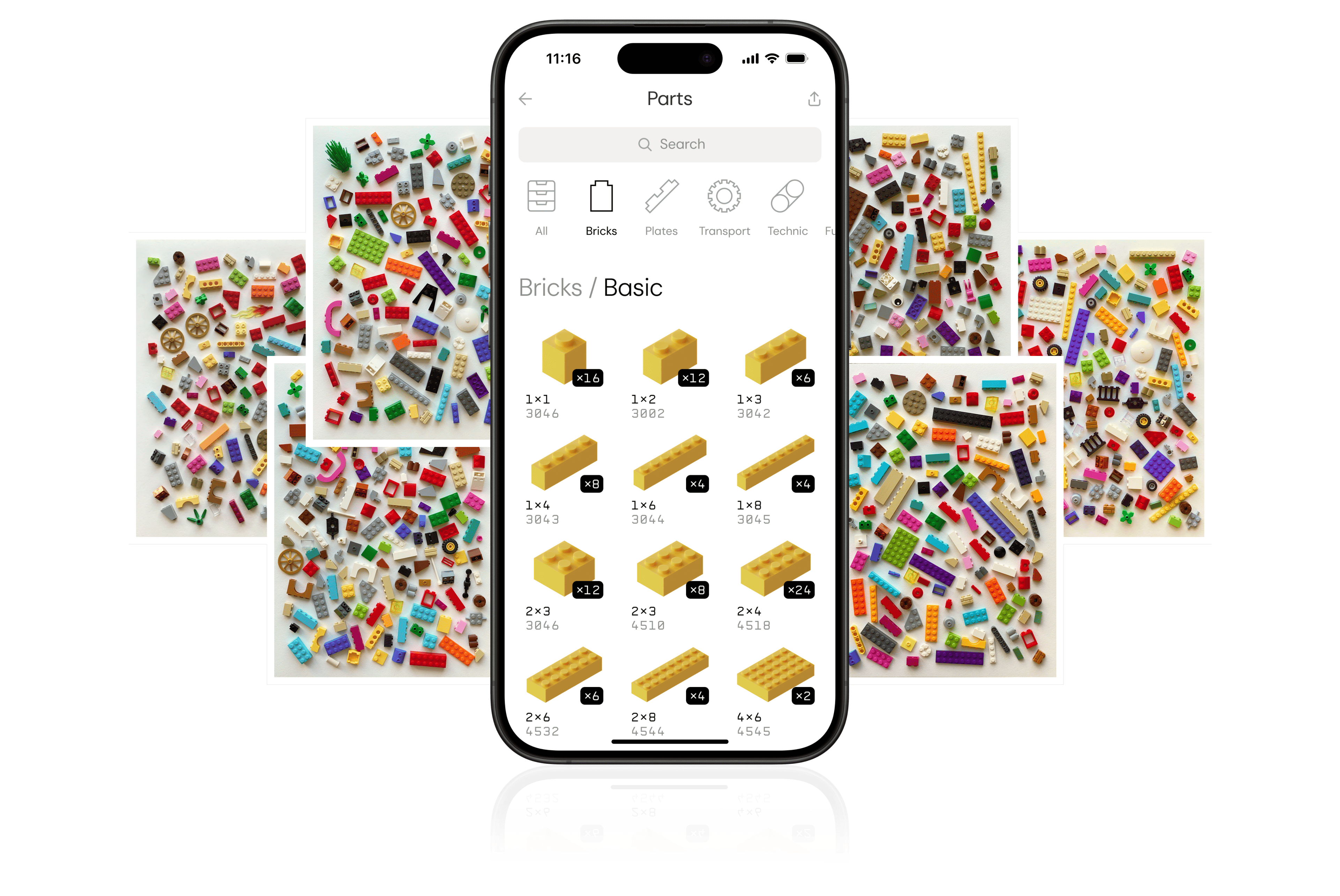
The app has a complete catalog of every brick you have and where it is stored.
Setup & benefits
All you need to do for setup is to scan the LEGO bricks you have batch by batch using the Brickit app and put them in numbered bags. It is not that hard to organize, and everything becomes easy afterward:
 Brickit Pockets always knows which bag contains the exact shape you need and how many you have.
 Medium-sized transparent bags with under 200 bricks are surprisingly handy! When you find the right bag, you can immediately see the needed brick and easily take it out.
 There is an integrated building ideas catalog, and you instantly know if you have enough bricks for any building idea you like.
 You can export your collection to a website with building ideas, such as Rebrickable, to see how your collection matches the build you like.
 It’s easy to check if your collection has enough bricks to recreate any set you miss.
 And selling an indexed collection of specific bricks is much easier than selling an enigmatic pile of something.
Maintenance
Maintenance is simple and consists of two steps:
Any Caveats?
Well, yes and no. First, you still need time to set up the system. Second, even though we’re constantly improving our brick scanner, some mistakes are still made. That’s why we pay lots of attention to making fine-tuning as easy as possible: you don’t have to rely on the scanner exclusively; you can adjust whatever you want.
Still, the scanner mainly just works, especially if you follow the prep guides. Setup is more straightforward than for most other methods, and you can always combine Pockets with any other sorting method you like: there is a batch editing feature precisely for this.
Download
Hopefully, there will be a day when we digitize all the world’s bricks, brick by brick, and no brick will be wasted tucked away. You can bring this moment closer by downloading Brickit from the App Store or Google Play and trying Pockets!

FAQ
Is Brickit a LEGO inventory app?
Yes. Brickit can be used as a LEGO inventory app. With Brickit Pockets, you scan your loose bricks, store them in numbered bags, and create a searchable digital catalog of your collection.
Can Brickit help me catalog loose bricks?
Yes. Brickit is designed to help you catalog loose LEGO bricks without manually identifying every part. You scan batches of bricks with the app, then Brickit creates a digital inventory that shows what pieces you have and where they are stored.
How is Brickit Pockets different from sorting bricks by color or shape?
Sorting by color or shape helps with storage, but it does not give you a searchable inventory. Brickit Pockets connects physical storage with a digital catalog, so you can search for specific parts and know which numbered bag contains them.
Can Brickit tell me what I can build with my bricks collection?
Yes. Once your bricks are scanned, Brickit can show building ideas that match the pieces in your collection. This helps you find things to build from the bricks you already own.
Can I use Brickit with Rebrickable?
Yes. Brickit Pockets lets you export your collection to building-idea websites such as Rebrickable, so you can check how your collection matches external builds.
Is Brickit officially made by LEGO?
No. LEGO® is a trademark of the LEGO Group, which does not sponsor, authorize, or endorse Brickit or the Brickit app.